I turned my Video OS into a film studio you can walk inside.
Most case studies ask you to scroll through a process. I wanted you to step inside mine — from the first creative decision all the way to a seat in the screening room.
What's in this case study
- 01The idea
- 02The design principle
- 03Arrival
- 04Octo reception
- 05Spatial navigation
- 06Frame Hall
- 07Development
- 083D / Previs Lab
- 09Stage 01
- 10Generation + Dailies
- 11Post
- 12Screening Room
- 13Small discoveries
- 14R&D / Holo
- 15Environmental UX
- 16Sound as space
- 17Why Three.js, not one Blender scene
- 18Building with AI
- 19Designing the system, not screens
- 20Performance as a design constraint
- 21Feature lock
- 22The result
A workflow is easier to feel than to explain.
My Video OS started as a way to connect all the separate parts of AI filmmaking — direction, look development, 3D previs, generation, editing — into one production system.
But every time I tried to explain it on a normal website, something got lost. A diagram could show the pipeline. Screenshots could show the tools. Videos could show the results. None of them showed what I was actually building: a connected production environment.
So I asked a simple question. What if the case study didn't explain the workflow — what if it let you walk through it?
Instead of reading the workflow, you walk through it.
- Creative direction Lobby
- Film DNA Development
- Look development Development
- 3D previs + camera design Previs Lab
- Production Stage 01
- AI generation Dailies
- Dailies + selection Dailies
- Post Post suite
- Final film Screening
From portfolio to experience
The goal was never to build “a cool Three.js website.” It was to turn the production process itself into the way you interact with the page. Flip between the two to see the difference.
The complete visitor journey
One continuous path — scroll sideways to follow it.
- Enter studio
- Octo says hi
- Open HUD map
- Film DNA
- Select look
- 3D previs
- Operate camera
- Shoot Shot 04
- Dailies
- Post
- Screening
A film studio first. Not an AI showroom.
I set one rule early on, and it shaped almost every decision after it. I wanted you to think “this feels like a real production company” long before you think “this is a 3D website.”
Cinema cameras, lighting rigs, monitors, storyboards, editing suites, signage.
Rain, reflections, practical light, an establishing shot before you get control.
It's everywhere in the building — it just never gets to be the architecture.
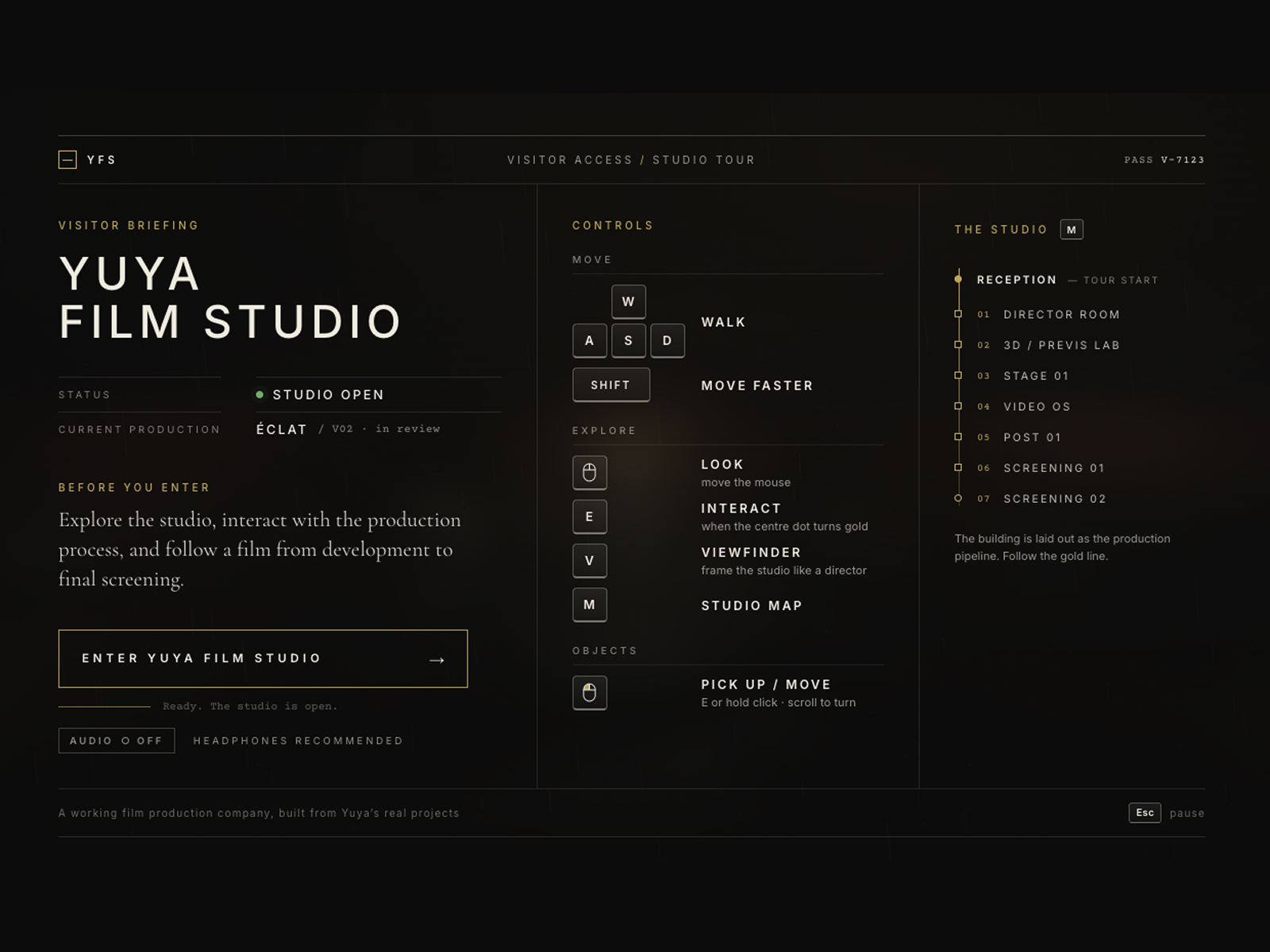
Try it — press the keys on your keyboard, or tap them.
The establishing shot
Before you enter, a short briefing explains the controls — styled like studio paperwork, not a game tutorial. Sound is yours to turn on or off, before you enter and at any point after.
- Ext.It's night. Rain falls across the parking lot and the wet ground reflects the warm studio lights.
- Ext.A production vehicle sits beside the building. Through the glass, the lobby is already glowing.
- MoveYou don't get control yet. The camera guides you toward the doors, like an opening shot.
- Int.The doors open. You step inside. Only then does the studio hand you the controls.
Designing for “where am I?”
A website has navigation. A physical space has orientation. Once my portfolio became a world, there was no navbar anymore — so I rebuilt navigation as a set of layers, each one answering one question. Tap a question to see which layer answers it, right on top of the real lobby.
Octo, the studio receptionist, isn't a game companion. Its job is UX: say hello, get you oriented, suggest a first stop — and then step back so the studio can speak for itself.
None of these were added because they looked cool. Each one solves a specific UX problem.
Every room follows one rule: understand, then experience.
Each department gives you just enough to understand what happens there, then something meaningful to do. Pick a room on the studio map.
The world is the interface
The biggest challenge was avoiding normal website UI. Instead of floating panels everywhere, information lives in the building itself.
Follow the gold line.
The Frame Hall connects every department, and a gold line on the floor runs through them in production order — from the rainy parking lot to the last seat in Screening 02. Drag through the whole walk.
Every door off the hall is one step from idea to finished film.
The hall follows one shot
Along the walls, gallery-lit frames follow a single ÉCLAT shot through its whole production life — so before you enter any room, the hall has already told you the studio's central idea.
AI filmmaking is a process, not a single generation.
Don't just click. Affect the production.
In the Director Room, my Film DNA system breaks creative direction into camera, motion, light, environment, color and emotion. But I didn't want you to just read about it — so the lookbook wall actually changes the set you'll walk onto later in Stage 01.
Choose a look
This is a production decision, not a filter. Watch the set.
The shot is designed before it's generated.
People often assume camera language in AI film just “happens” during generation. My workflow flips that. In the Previs Lab, Blender-inspired workstations show my three real ÉCLAT previs shots with their actual camera rigs and keyframes. Switch lenses to see how each one frames the set.
“I use Blender.”
I use 3D to direct the shot before generation.
Shot 04 was never made. So I gave it to you.
Stage 01 is a working ÉCLAT tabletop set — camera crane, production lights, a video village with a live feed, and a clapperboard for every take. The real project only produced three shots. Instead of pretending the fourth exists, I turned the gap into the most important interaction in the studio.
- Shot 0135mm dolly✓
- Shot 0250mm 18° orbit✓
- Shot 0385mm macro✓
- Shot 04Hero — yours to shoot—
This moment changes the whole experience from “look at how I made this” into “step inside the system and take part in it.”
Dailies
Shot 01 · A
Shot 02 · B
Shot 03 · A
Dailies, then Post
Your take lands on a wall of real generated clips — Seedance and MiniMax generations, next to the previs they came from. The point isn't to celebrate a model. Models are just part of the pipeline; the film stays the hero. Then Post gets darker and quieter: an After Effects–style timeline synced to the V01 edit, my YUYA Motion recipes, and a chair where you can sit and listen to the V02 mix.
Sound is part of the architecture.
Rain outside. Interior sound creeping in as you reach the doors. A different acoustic space once you're through them. Each room has its own quiet tone, and the screening room finally gives the film all of your ears. It's always optional, too — the studio still makes sense with sound off.
Small surprises, not more rooms
Not every idea needs a department. A YUYA keychain sits at reception. It doesn't move the story forward — it just rewards curiosity. Go ahead, pick it up and throw it.
Holo
An experimental interface I'm exploring, installed as a quiet R&D corner. It sleeps until someone gets close — then wakes up, right where you are.
Production shows how I work today.
R&D hints at what's next.
Built with AI. Directed by me.
AI didn't replace the creative direction here — it carried it out. I started agents from a high-level goal instead of spelling out every detail, which gave them room to propose spatial ideas I could then judge as a designer. It felt less like prompting components and more like working with a production crew.
What I defined
- The core concept and production journey
- Visual direction and Film DNA logic
- Spatial UX principles and interaction ideas
- How my real projects connect to each room
What the system connects
- Development shapes Stage 01
- Previs informs the camera; the camera makes a take
- Your take appears in Dailies, then flows to Post
- Your choices come back in the Screening Room
Designing the system, not just the screens
Spatial UX turned out to be less about designing screens, and more about designing relationships. Octo connects onboarding to navigation. The map connects physical space to the production pipeline. And your actions stay with you from room to room.
That loop is what turned a 3D portfolio into an interactive production experience.
Why Three.js instead of one big Blender scene?
I deliberately didn't build the whole studio as a single Blender environment. The building needed to stay interactive, modular and web-friendly — so most of it is built with web-native 3D, while the high-value props and production objects come from dedicated 3D workflows. Blender stays part of the filmmaking. Three.js is what makes the production system explorable.
More control over
Knowing when to stop.
As the studio grew, adding another room kept getting easier. The harder call was stopping. So I set a V1 feature lock, and the question changed from “what else can I add?” to “how do I make every existing moment feel intentional?”
Performance as a design constraint
A spatial portfolio can become impressive very quickly — and unusable just as quickly. So I stopped treating every object as equally important.
More isn't automatically better.
- Video wakes up only when it's in context
- Secondary experiences stay dormant until you approach
- Not every light needs real-time shadows
- Not every decorative object needs detailed collision
- Not every project needs its own room
Does this strengthen the journey from creative direction to final screening?
My editing rule. If the answer isn't yes, it goes. Tap to test each idea.
Where the time went instead
The last stretch wasn't about adding features. It was lights that don't all cast real-time shadows, video that only wakes up when you're nearby, decorative objects without heavy collision — and a steady frame rate.
The final challenge wasn't making the world bigger. It was making it believable.
Beyond the portfolio.
V1 is finished and live. But the studio was never meant to be the end point — it could become the spatial interface for the Video OS itself.
Explore the studio
Live now — see how Yuya makes films
The version you can walk through today. Visit every department, make production decisions, shoot a take and watch the film.
- Enter the studio
- Director Room
- 3D Lab
- Stage 01
- Video OS dailies
- Post 01
- Screening
Use the studio
Make something inside my production system
The studio connects to the real Video OS. You don't just watch my workflow — you start your own project and carry it all the way to the screen.
- New project
- Creative direction
- Film DNA
- Shot plan
- 3D previs
- Generation
- Dailies
- Post
- Screening
Intelligent studio
Agents operate the production company
Every department gets an AI crew member. You stay the director — the agents run the departments.
- Director agent
- Shot agent
- Previs
- Generation
- Continuity
- Post
The 3D studio isn't the end point. It could become the spatial interface of the Video OS.
Stop explaining. Watch.
The last room has almost no explanation, on purpose. Every other room shows how the film was made. This one shows why. You take a seat, the lights dim, the curtains open — and the interface gets out of the way.
ÉCLAT
A Yuya Film Studio production
The result
Yuya Film Studio became more than a portfolio. It's a spatial picture of how I think about filmmaking. You don't just see finished work — you experience how it's made.
- How an idea becomes direction
- How direction becomes a shot
- How a shot becomes previs
- How previs becomes production
- How production becomes generated material
- How material becomes an edit
- How the edit becomes a film
The environment teaches. The objects invite interaction. The production system creates consequences. The film provides the payoff.
Credits
- Creative direction
- Yuya Mei
- Concept + experience design
- Yuya Mei
- Spatial UX + interaction
- Yuya Mei
- Film direction + Film DNA
- Yuya Mei
- 3D + previs direction
- Yuya Mei
- Video OS concept
- Yuya Mei
- WebGL build
- Agentic AI workflow, under Yuya's direction
- ÉCLAT film assets
- Yuya Film Studio