Claude Code Mods look like a small customization feature. A way to change some colors, maybe add a status line. That was my first read, and I was wrong about it.
After spending real time with what Mods can do, I think they're something else entirely: Claude Code is turning into a programmable AI workspace.
Until now most of us pictured it as a straight line. You give Claude a task. Claude reads files, writes code, runs commands, hands back a result. Terminal in, code out. Mods add a whole layer that wasn't there:
RUNTIME
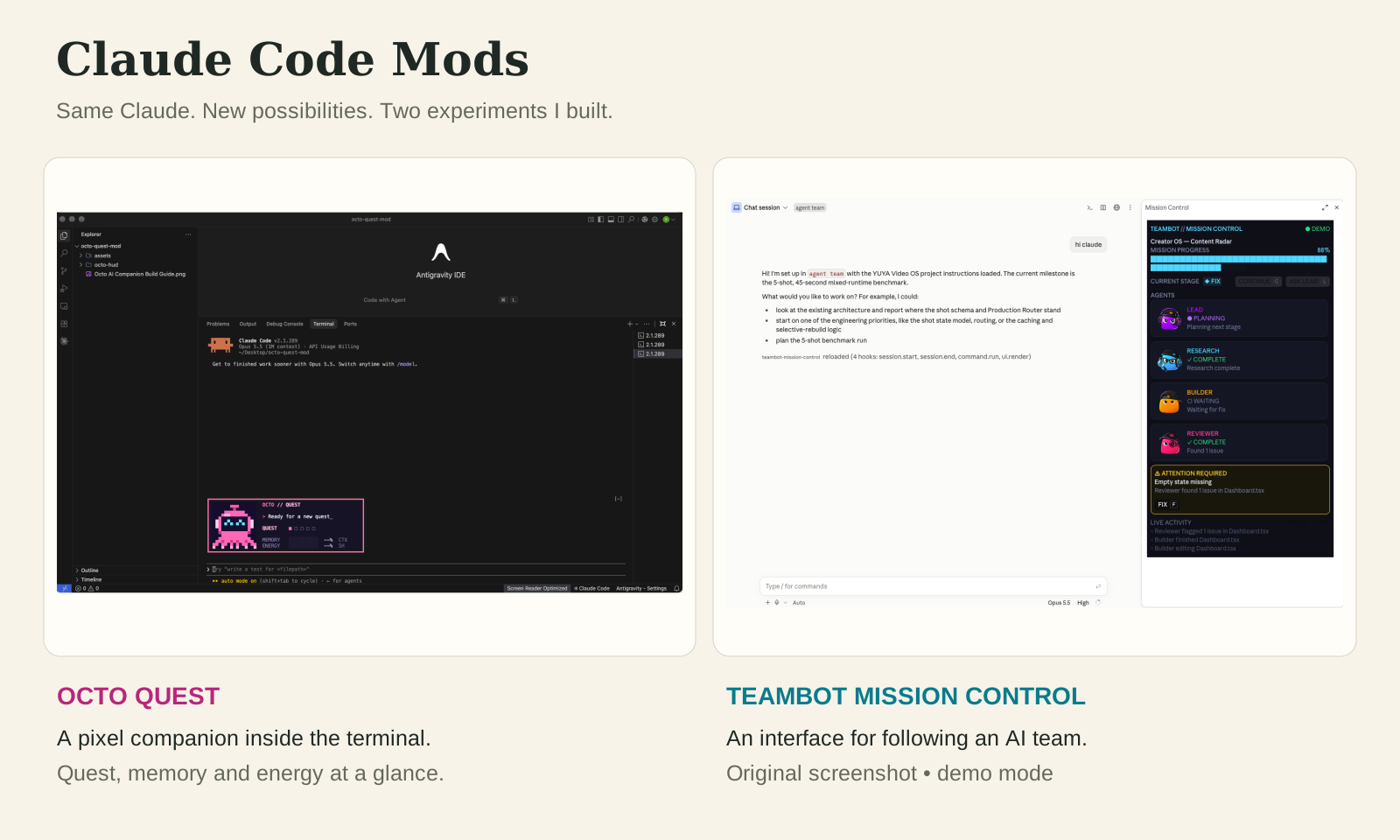
What a Mod actually is
Let me drop the technical language for a second. Think of Claude Code as a phone. It works fine out of the box. But you probably want it to behave the way you work.
Maybe you want it to show project progress. Warn you before something destructive. Visualize how full the context window is. Show your remaining usage. Track several agents at once. Remember session state. Tell you which files are being touched right now. Give you a button for the thing you do twenty times a day. Render a diagram instead of dumping diagram source at you.
Concretely it's a TypeScript module that ships inside a plugin. It hooks events as they happen and can observe them, respond to them, rewrite some of them, keep state, and draw its own interface. Which is a lot more than adding another prompt.
The shape is simpler than you'd expect. Every hook is the same three arguments:
next is what decides whether your Mod watches, blocks, or rewrites.Three things a Mod can do
I find it easiest to think in three categories — and each one maps to one thing you can do with that next function. Click through them:
That second one deserves a pause. A Mod that blocks a call isn't giving Claude another instruction and hoping it listens. It's participating in the execution environment. The call doesn't happen unless the Mod lets it through.
Here's the case everyone imagines first. Claude decides to delete 41 files. Pick what your Mod does about it:
next. None is what happens today if nothing is watching.And the third category — DISPLAY — is the one I think is most underrated. A Mod can take invisible system state and turn it into something a human can actually read. Instead of Claude is working... you can have a panel that tells you what's being built, by whom, how far along, and whether anything needs you. More on that below, because it's the part I ended up caring about most.

The ecosystem
Six overlapping words, six different jobs.
Prompt vs Skill vs Hook vs MCP vs Plugin vs Mod
This is the most confusing part of the Claude ecosystem right now, and I don't think that's anyone's fault — these things genuinely overlap. Here's how I keep them straight. Tap a row:
| Technology | Main purpose | Mental model |
|---|---|---|
| Prompt | Tell Claude what to do now | Instruction |
| Skill | Teach a reusable way of doing something | Playbook |
| Hook | React automatically when something happens | Trigger |
| MCP | Give Claude access to external tools | Connection |
| Plugin | Package and distribute capabilities | Package |
| Mod | Customize runtime behavior and interface | Runtime extension |
The shorthand I use: prompts tell Claude what to do. Skills teach it how you prefer things done. MCP gives it access to more things. Hooks react to events. Plugins package capabilities. Mods change the Claude Code experience itself.
Hook vs Mod — the one that matters
This distinction is worth extra attention, because classic hooks have been genuinely useful in Claude Code for a while. A shell hook fires when something happens: Claude edits a file, your hook runs ESLint and returns the result. Claude tries a dangerous command, your hook runs a safety check and answers allow or block.
That's great for running tests after edits, formatting, logging, validating commands, sending notifications, enforcing rules. I think of those as automation, guardrails and triggers, and they still do that job well.
Mods work at a different layer:
returns allow / block / text
Hooks react to Claude Code. Mods become part of it.
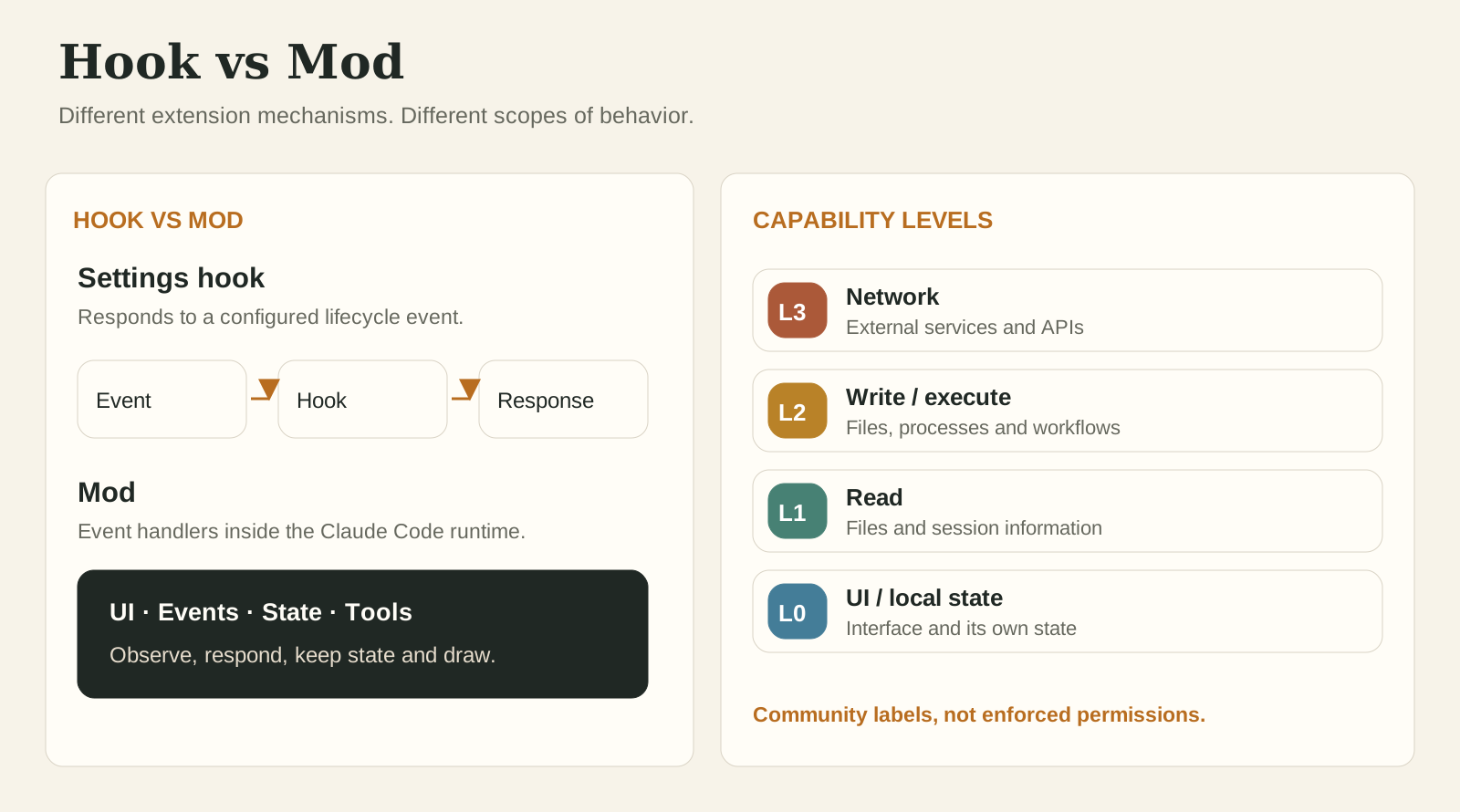
How far does a Mod reach?
Not every Mod should have the same access, and this is where I'd slow down before installing things. A useful way to classify them is by reach — and I want to flag that this isn't an official Anthropic permission system. It's a community model. But it's not just a thought experiment either: the public awesome-claude-code-mods catalogue runs a footprint scanner over every mod on GitHub and labels each one exactly this way. Tap a level:
claude plugin validate <mod folder> reads a mod's source the way the engine will and reports what it hooks and what it calls — so you can see a mod's real footprint before you trust it with your repo.The interface problem
The bottleneck moved, and most people haven't noticed.
From tool to platform
Here's the bigger idea. The old shape was Claude → terminal → code, and the interface was something we accepted as given. The new shape is a runtime with seams in it, and those seams are where Mods live. That makes Claude Code feel less like a fixed coding interface and more like a programmable environment built around an AI agent.
Which matters, because agents have developed a problem that more intelligence doesn't fix.
Agents got autonomous. Humans got blind.
Agents now research, plan, edit files, run commands, delegate work, spawn subagents, test applications and review results. All good. But the more they do on their own, the less you can see.
And suddenly you're asking: what is it doing right now? Why did it make that call? Which files is it changing? How far through is it? Which agent owns this? Are two of them editing the same file? Does anything need my approval? Is the context window about to fill up?
Notice none of those are questions about intelligence. The model isn't the bottleneck anymore.
The bottleneck is observability.
That's why I think the UI side of Mods is being badly underestimated. A lot of the early demos are deliberately playful — games, silly status displays, custom themes, ambient worlds. They're fun, and some are gloriously stupid. But underneath the experiments is something serious: developers can now turn raw Claude activity into interfaces humans understand.
Several community Mods already point straight at it.
cctop — a cockpit instead of a chat log
cctop borrows from btop. Rather than watching Claude work and guessing, you get a live dashboard of the session's vital signs — context fill, token usage, cost, cache hit rate, rate limits, tool latency, subagents:
context-lens and quota-meter — making the invisible legible
Context is abstract. You know there's a window, but during a long task it's not intuitive what's happening to it. Same with usage: you either check manually or you find out when you hit the wall. Two small Mods fix both by just… showing you:
agent-flow — seeing the shape of the work
Multi-agent workflows get incomprehensible fast. "Agent running…" tells you nothing. A live tree tells you everything:
- RESEARCHrunning
- Search3 queries
- Analyzequeued
- BUILDERrunning
- CodeDashboard.tsx
- Testqueued
- REVIEWERwaiting
- Review
There's also claude-mermaid, which renders Mermaid blocks into actual diagrams instead of making you read diagram source. Different surface, identical pattern: raw AI information → Mod → human-readable interface. That pattern goes far beyond diagrams.
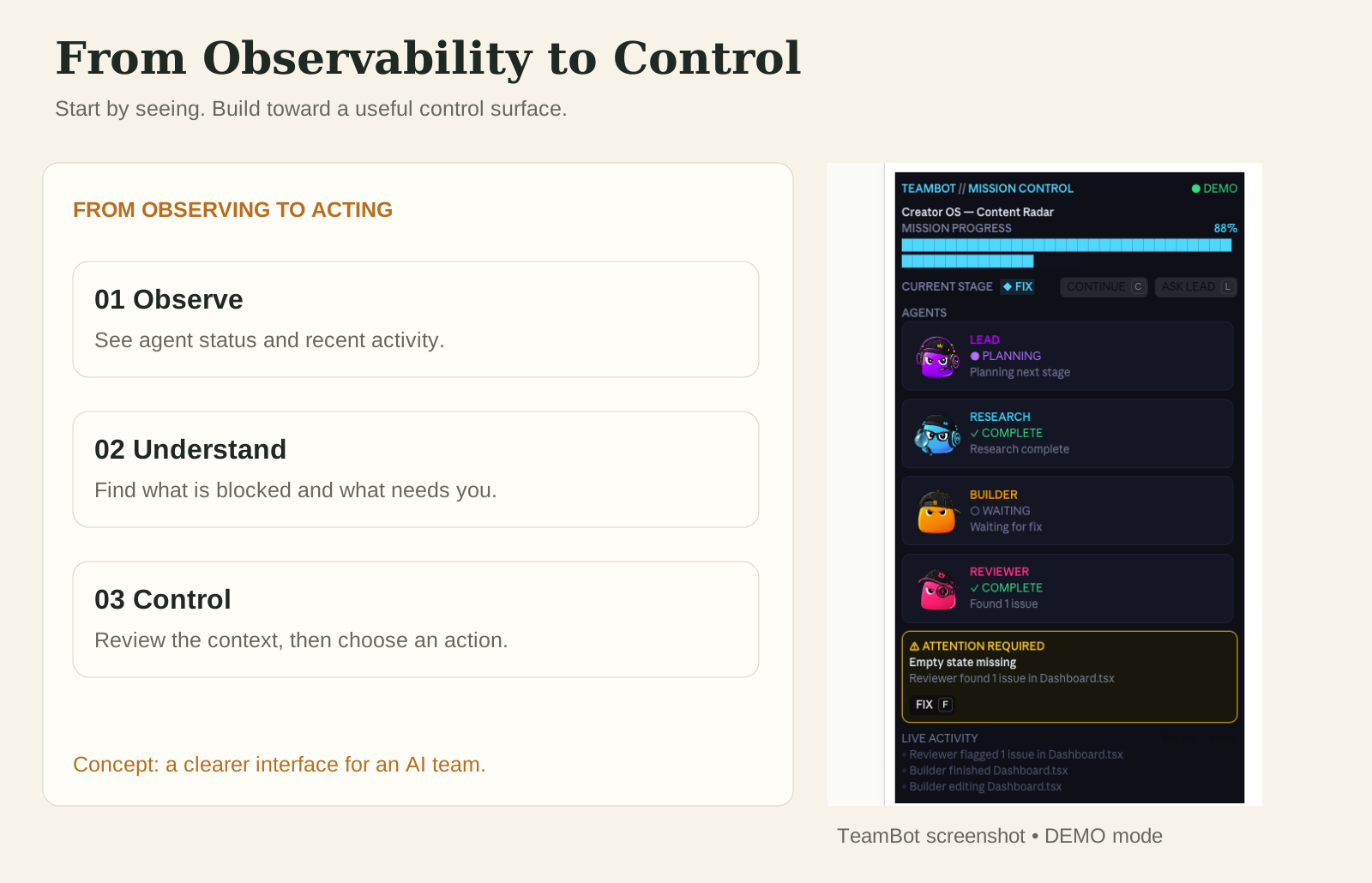
What kinds of Mods are showing up
The ecosystem is young — the public catalogue sits at around 31 scanned mods from 92 candidate repos as I write this — but the categories are already clear, and each one answers a real question:
Context & usage
How healthy is my session?
- token-ledger
- context-lens
- cctop
- quota-meter
Workflow
Can I move through work faster?
- replay theater
- autodev-core
- cache keeper
- next steps
Agents
What are my agents doing?
- agent-flow
- subagent dashboards
- workflow monitors
Safety
Should Claude be allowed to?
- secret-redactor
- blast radius
- collision warnings
- command guards
UI
Can it fit how I work?
- claude-mermaid
- ambient interfaces
- model / effort controls
- custom status lines
Experimental
What is this thing capable of?
- multiplayer games
- ambient worlds
- terminal browsers
- things to do while waiting
Building one
The part I'm actually doing instead of just reading about.
I didn't want to install ten Mods. I wanted to build one.
After going through the ecosystem my question stopped being "which ten should I install?" and became: what happens if I build Mods around my own AI system?
I already run a multi-agent setup I call TeamBot. Rather than treating AI as one assistant, the work is split across roles:
Because as more agents work at once: who's doing what? What's finished? What's blocked? What needs me? Are two of them touching the same file? That's the exact blindness I described above — except now I'm the one who built it.
Experiment 01 — TeamBot Mission Control
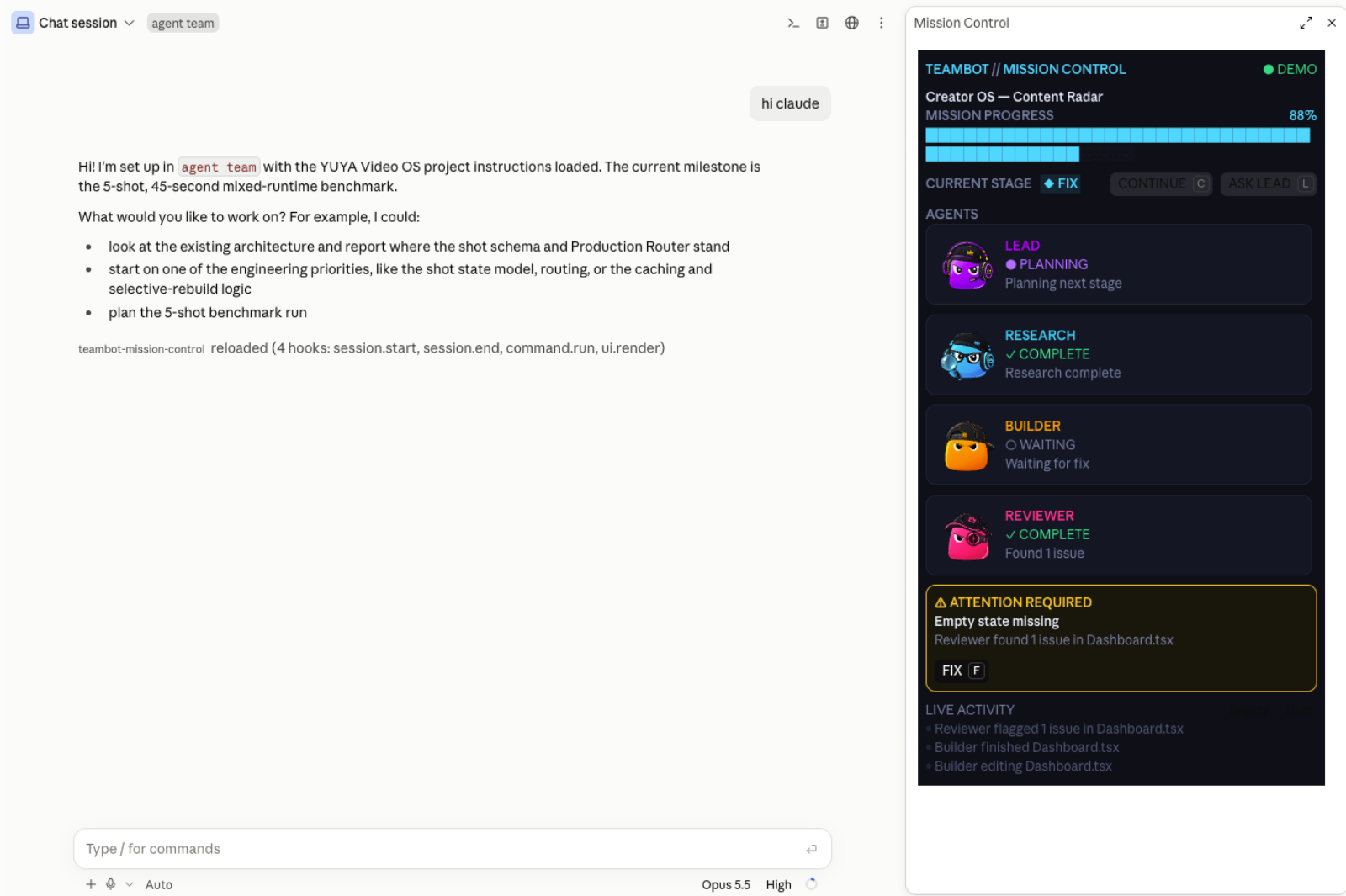
So rather than another generic Claude dashboard, I want an interface built specifically for running an AI team. I have built a demo of that interface. The interactive concept below uses simulated data — click an agent; my actual demo screenshot follows:
Experiment 02 — Octo Quest
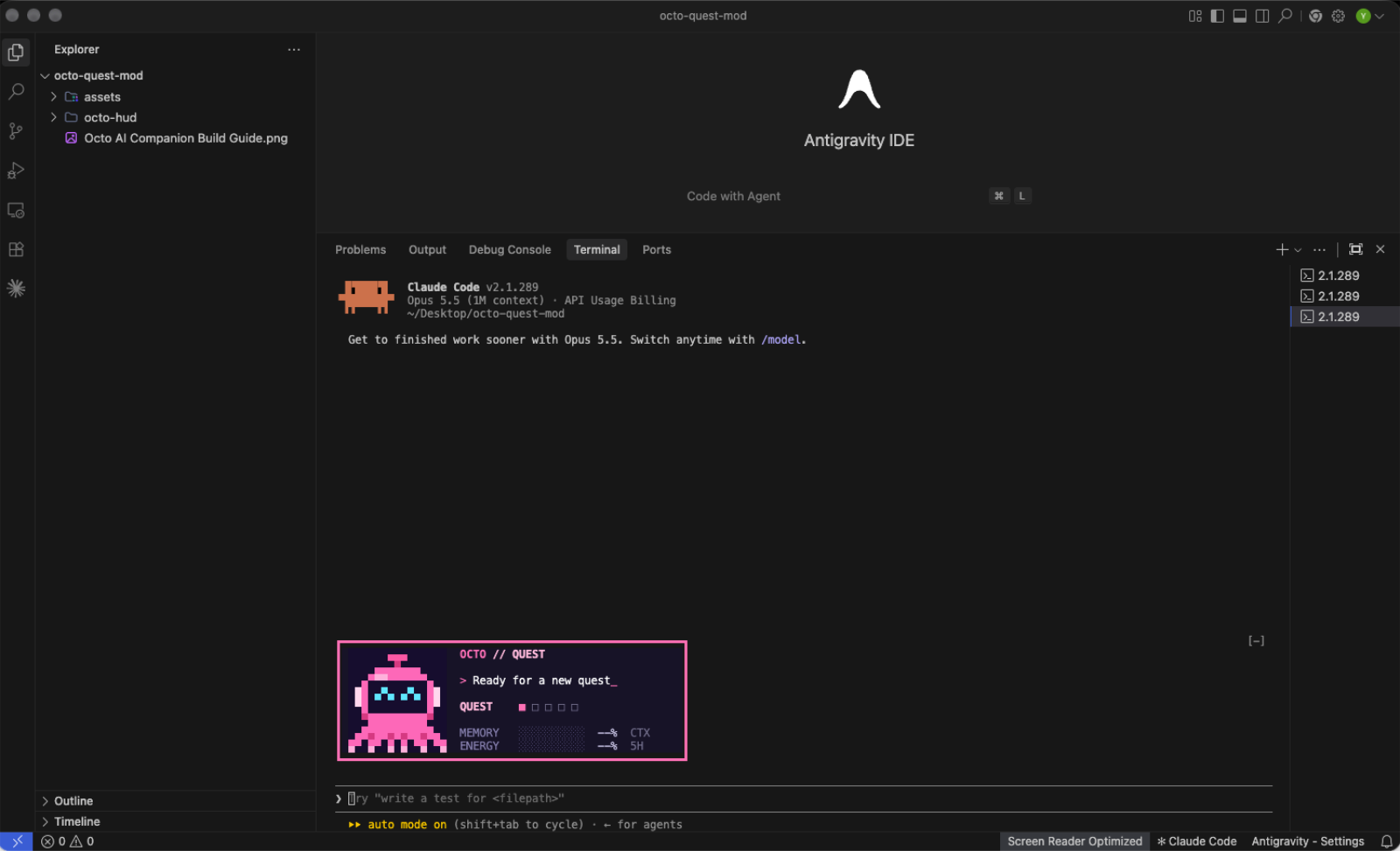
My other experiment is Octo Quest: a small pixel-art companion inside the terminal. The screenshot shows the pink octopus, a quest indicator, and memory and energy fields. Those fields are still showing placeholder values in this capture.
From dashboard to control surface
I don't want Mission Control to just say Builder: working. That's a status light, and status lights don't help you. Clicking Builder should give me something I can act on — what it's building, how far in, which file it has open right now, what it's waiting for, and the buttons to do something about it.
That's the difference between a dashboard and a control surface. A dashboard tells you the state of the world. A control surface lets you change it. Mods are the first thing that make the second one possible inside Claude Code, because a Mod can both see the agent's state and act on the event stream — the same loop, in one place.
The piece I keep coming back to is approval. Right now, when an agent in my setup hits something that needs a human, the signal is… a line of text scrolling past, which I may or may not be looking at. With a Mod, that becomes a pane that persists, a toast that interrupts, and a button that resolves it. Same information, completely different reliability.
What I'm building next
I'm starting small, because the lesson from every other extension ecosystem is that people over-build their first one and never ship it. So: Mission Control as a read-only pane first — agents, status, current file, progress. L0 territory, nothing it can break.
Then one approval control, because that's the thing that actually costs me time today. Then collision detection, because two agents editing the same file is the failure mode I hit most and the one I can never see coming.
If that works, the interesting question opens up: once your AI team has a control room, does the way you delegate change? I suspect it does. It's much easier to hand work to four agents when you can see all four of them.
The part I keep thinking about
Mods will produce a lot of noise. Themes, games, novelty status lines, things that exist because someone could. That's fine — that's every platform's first year.
But the quiet version of this story is that we spent two years making agents more capable and almost no time making them legible. Every serious autonomous system humans work alongside — planes, factories, trading desks, operating rooms — eventually grew an instrument panel. Not because the system was weak, but because the humans needed somewhere to look.
Claude Code just got the ability to grow one. I think that's the actual headline, and I don't think it's about customization at all.
cctop, context-lens, quota-meter, token-ledger, agent-flow, claude-mermaid — are listed there. The explanatory graphics have been rebuilt as vector diagrams for readability. Embedded demo screenshots are the original captures. The interactive examples use simulated data. Octo Quest and TeamBot screenshots are my own demos; TeamBot is shown in DEMO mode.